SIG Sauer VISA: The Physical & Digital Cardholder Journey
Designing an end-to-end co-branded credit card program that scaled 25× from pilot to live App Store release.
- 26.0×
- Growth from Pilot (727 Cards)
- $1.19M+
- Settled Purchase Volume
- 3,619
- Applications Submitted
1. Taking a Co-Branded Credit Card Program from Sketch to Reality
When we partnered with SIG Sauer in 2024 to launch their first co-branded rewards credit card, there was no existing template to copy—we were taking the idea of a credit card program from a blank page to a real card in people's hands.
As the sole product designer at Jassby, I worked side by side with our CTO, Chief Compliance Officer, and eight engineers to design the entire program from scratch. That meant starting with early sketches of the physical matte-black card itself, working through print proofs so the card felt as solid as SIG's hardware, and shaping every digital screen around it—from the acquisition page and credit application on sigsauer.com/credit-card to the native iOS and Android apps and an in-app camera receipt-rewards flow built with Snipp Interactive.
Watching our first 28 pilot cardholders activate their cards and make their first purchases taught us where every point of friction lived. Since that pilot, the program has grown 26.0× to 727 active cardholders, processed 3,619 credit applications (701 approved and 87 pre-approved with zero application submission errors), driven $1,187,464+ in settled purchase volume across 9,006 purchases (reaching $422,000/month in October 2026, up +30.0% MoM), and maintained 99.7% cardholder retention across iOS, Android, and web. Perhaps the most valuable part of building the program from the ground up was seeing how a shared Material 3 design system and interactive prototypes brought our designers, engineers, compliance officers, and partners onto the same page—turning complex banking rules into a shared language.
2. The Problem: Why People Drop Off During Credit Applications
More than 60% of people who start an online credit card application abandon it before finishing. When we looked at why, three things stood out:
- Sensitive personal data: Asking for a Social Security Number, annual income, and monthly housing payment right away makes people hesitate.
- Walls of legal text: Truth in Lending (TILA) disclosures, Patriot Act identity notices, and electronic consent are legally required, but most banks dump them into giant PDFs or jarring pop-ups.
- Disconnected branding: Most white-label card applications look like a generic 2008 bank form, breaking the trust that brought the customer there from the brand's site.
Our Approach
"We broke the application into four manageable steps, cut out unnecessary typing on mobile, kept legal disclosures inline so people never lose their place, and carried the look of the physical card all the way from the landing page to Apple Wallet."
3. Physical Card Art
Before designing the screens, I started with the physical object: the card itself.

Front and back of the shipped SIG VISA card, as rendered on the landing page.
- Matching the hardware: I built 3D card mockups with a matte-black finish, subtle metallic accents, and clean edges that felt authentic to SIG's products.
- Physical-to-digital continuity: We used the same card artwork across the
sigsauer.comlanding page, Apple Wallet, Google Wallet, and the mobile app home screen so cardholders immediately recognize their card.
4. Landing Page & 4-Step Application (sigsauer.com)
A. Iterating the Landing Page with Bank Compliance
- Live at sigsauer.com/credit-card and built on our shared MUI web components.
- From early concept to compliance sign-off (
v1.0→v2.12): Working directly with our Chief Compliance Officer and our issuing bank's legal team (The Bank of Missouri), we iterated the landing page from an early marketing concept into a clear, compliant page:- Clear reward terms: Updated early "Cash Back" copy to exact reward terms—"Discount Codes for SIG SAUER items" (
5% on SIG Purchases+,3% on Gas, Grocery, & Sporting Goods+,1% on All Other Qualifying Purchases+)—with direct links to*Rates & Termsand+Rewards Program Terms & Conditionsright in the hero. - Answering the credit score question upfront: Added an FAQ accordion that plainly answers "Can I find out if I'll be approved without hurting my credit score?", explaining the difference between our initial soft credit check and the final hard inquiry if they accept an offer.
- Military & invitation details: Spelled out eligibility rules clearly, including support for military
APO/FPOaddresses,SSN or ITIN, and the 30-day invitation window.
- Clear reward terms: Updated early "Cash Back" copy to exact reward terms—"Discount Codes for SIG SAUER items" (


B. The 4-Section Credit Application
- Section 1 — Contact Information, Address Autocomplete & Inline Consents (
Fig 4.2): Legal name, mobile number, email address, Residential Address with Google Places autocomplete (cutting mobile typing by ~70% while blocking PO boxes and commercial addresses upfront), and three inline checkboxes:Electronic Communications Policy,Terms of Use&Privacy Policy, and TCPA call/SMS consent. - In-Flow Electronic Communications Policy Modal (
Fig 4.3): ClickingElectronic Communications Policyopens an in-flow modal overlay (with a top-right print button) rather than bouncing applicants to a separate PDF tab. TheAGREEbutton remains disabled until the applicant scrolls to the bottom of the disclosure. - Section 2 — Personal Information: Date of Birth, masked
SSN/ITINandConfirm SSN/ITINinputs with show/hide toggles, Patriot Act identity notice, and credit-freeze guidance. - Section 3 — Financial Information & Soft-Pull Pre-Approval (
Fig 4.4) → Section 4 (Offer Results): Employment status, monthly income, and monthly rent/mortgage paired with theApplication and Solicitation Disclosurecheckbox and FCRA written instructions aboveSUBMIT FOR PRE-APPROVAL—reassuring applicants that checking pre-approval will not hurt their credit score before revealing4 Offer Results.


5. iOS & Android App Experience
Once approved, cardholders download the SIG Credit app on iOS or Android:
- Instant Apple & Google Wallet Provisioning: Cardholders can add their virtual card to Apple Wallet or Google Wallet right away and use it before the physical card arrives in the mail.
- Card Controls: One-tap card lock/freeze, PIN changes, and lost-card replacement.
- Clear Rewards Tracking: Transactions show earned points alongside their reward tier (
5%,3%,1%). - Interactive Snipp Interactive Loyalty Integration: I designed the native camera receipt-verification flow from scratch so cardholders can snap a photo of an in-store receipt to earn
+2%bonus points on SIG gear—awarding 32,736 bonus points across18verified retail receipts (17,011points in October 2026 alone, up+128.6%MoM; see Section 6 below). - In-App Bill Pay: Designed the payment flow that has processed $651,832+ across 1,093 bill payments (reaching
$194.1Kin September and$212.5Kacross367payments in October 2026).
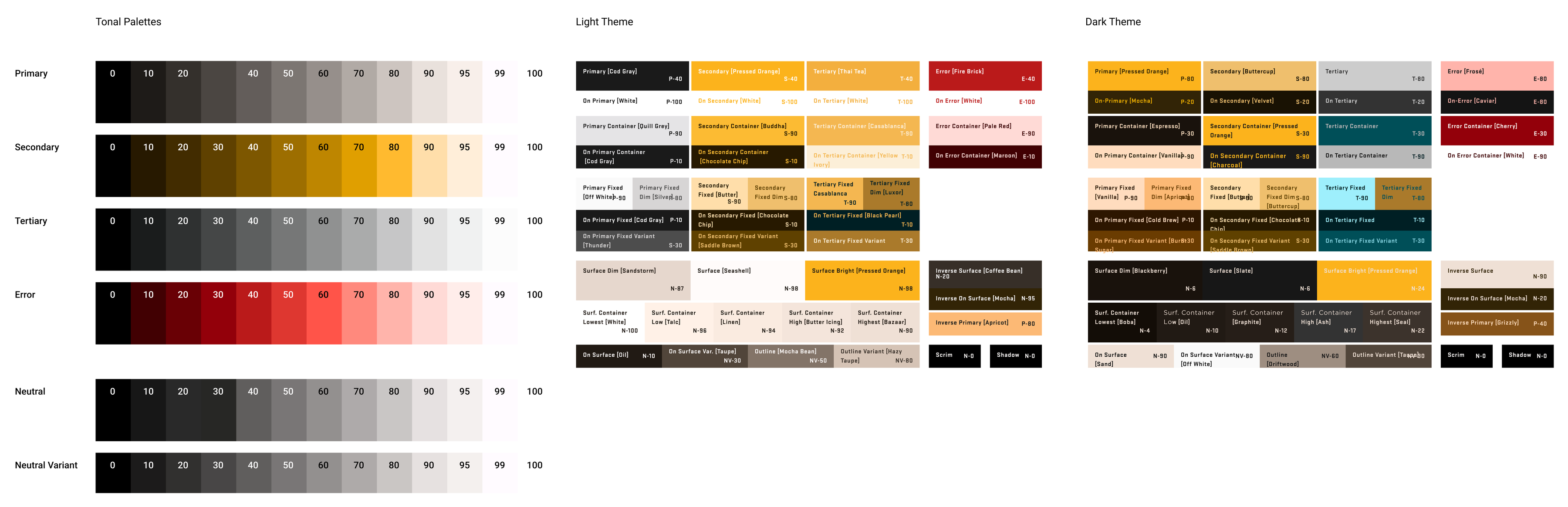
Material 3 Design Tokens
Rather than styling screens one by one, we built the mobile app on a shared Material 3 token system:
- Mapped color roles across Light and Dark modes (
Primary #FFB95A,Surface #131313,On-Primary #462A00). - Plugged those tokens directly into our mobile SDK components, making it much faster for our engineers to ship and theme new partner apps.
6. Designing Under Constraints: The Snipp Interactive Receipt-Verification Flow
One of my favorite design problems on this project sat right between Visa network limitations, third-party receipt scanning (Snipp Interactive), and high standards from SIG Sauer's technical executive.
Why We Needed Receipt Verification
When someone buys directly on sigsauer.com, Visa knows the merchant and automatically gives them the full 5% (5 points per dollar). But most customers buy SIG gear at local dealers or big sporting goods stores like Dick's Sporting Goods or Bass Pro Shops. Because Visa only tells us the store category (3% Sporting Goods) and the total dollar amount—never the individual items on the receipt—we had no automatic way to know if a $1,000 purchase at Dick's included SIG products.
Balancing Tradeoffs Between Snipp Interactive and SIG Sauer's Technical Executive
To give cardholders their missing +2% bonus ("SIG Product Points") on retail purchases, we integrated Snipp Interactive's receipt-verification service. Working through design reviews with Snipp Interactive's team and SIG Sauer's technical executive meant solving three real tensions:
- Keeping it native in our app: SIG Sauer's technical executive didn't want cardholders kicked out to a clunky third-party web portal. Every screen—opening the camera, checking the photo, seeing review status, and fixing a rejected receipt—had to live natively inside our dark-mode SIG Credit app.
- Handling async review times: Receipt verification isn't instant like swiping a card; Snipp Interactive has to read the receipt and verify product serial numbers. I mapped out every state (
Pending Settlement→Awaiting Upload→Pending Review→Purchase ValidatedorPurchase Rejected) so cardholders always knew where their points stood. - Showing SKU-level proof without cluttering the screen: When a
$1,000sporting goods receipt had four different SIG items on it, SIG Sauer's technical executive wanted cardholders to see the exact item-by-item breakdown of their+2%bonus, without leaving a giant receipt photo taking up the whole screen once it was approved.
What We Shipped
- Home Prompt & Camera Serial-Number Check (
Fig 6.1): We added a dismissible "Bought a SIG Sauer product?" card on the Home tab, a native camera/photo drawer, and a clear reminder on theReceipt Previewscreen to make sure the product serial number is visible before tappingSubmit. - The
"3%+"Badge & Two-Part Points Accordion (Fig 6.2): Once a receipt is approved, the transaction row gets a3%+badge (3%store base +2%verified SIG bonus). InsideTransaction Detail, I split the points into two clean accordions:Standard Reward Points (3,000 Points)andSIG Product Points (2,000 Points), which opens to show each verified item (P365 XL · $250.00 · +2% · 500 Points · Code 365-9-BXR3P) while hiding the old receipt photo to keep the screen clean. - Inline Rejection Recovery (
Fig 6.3): If Snipp Interactive rejects a photo, we show the reviewer's exact note right on the transaction ("We noticed that your submission is missing a serial number..." — Snipp Interactive Inc) with a one-tapCamera / Galleryretry sheet—plus a live banner if a receipt finishes review while you have the app open.


7. Closing the Loop: The Discount Codes & Points Redemption Flow
Earning points only matters if redeeming them feels effortless and transparent. Working with SIG Sauer and our compliance team, I designed the end-to-end Rewards & Discount Code Redemption flow (JASS-18305) inside the SIG Credit app so cardholders can turn their points into sigsauer.com Discount Codes ($25, $50, $100, and $250 tiers at 100 Points = $1.00) or statement credits:
- Clear Available vs. Pending Balances (
Fig 7.1a): TheRewards Summarybreaks downPoints Available, dollarValue,Pending Availability(the 30-day settlement window), andRedeemed This Yearat a glance. - Tiered Selection with Smart Eligibility States (
Fig 7.1b): OnClaim Discount Code, tiers that exceed the cardholder's current balance (such as the$250 Discount Code / 25,000 Pointstier when a user holds12,052 Points) are visually dimmed while eligible tiers ($100,$50,$25) stay active with custom SIG Sauer ticket illustrations. - Upfront Final-Sale & Expiration Disclosures (
Fig 7.1c): Before a cardholder tapsUse Points,Confirm Redemptiondisplays their exactRemaining Points Balance (4,087 Points), the exact expiration timestamp (December 31st, 2026 at 11:59PM), and plain-language final-sale terms. - Instant Code Issuance & One-Tap Copy (
Fig 7.1d): Upon confirmation ("Bullseye! Your Discount Code is Ready."), the app generates the code (SIGCC-2MMHEENPG4GG-100) with a one-tap copy button and saves all active codes directly in theRewardstab for easy checkout onsigsauer.com.
Across the program, cardholders have earned 3,125,464 reward points ($31,254.64 in value) across 6,953 reward-earning events (1,633,879 at 5x, 1,009,080 at 3x, and 482,505 at 1x—including 1,191,568 points / $11,915.68 earned in October 2026 alone) and completed 119 redemptions totaling $3,344.16—including 100 statement-credit redemptions ($1,819.16) and 19 sigsauer.com Discount Code redemptions ($1,525.00, with 13 codes for $1,050.00 redeemed in October 2026 alone, up 4.3× in count and 3.5× in dollar volume MoM) since Discount Codes launched in July 2026.


8. Program Results (Through Oct 2026)
| Metric | Pilot Baseline (Nov 2025) | Shipped Result (Oct 2026) |
|---|---|---|
| Active Cardholders | 28 Cards | 727 Active Cards (26.0× Growth) |
| Applications Submitted | 0 | 3,619 Applications (701 Approved · 87 Pre-Approved · 0 Errors) |
| Settled Purchase Volume | $12,080 / mo | $1,187,464+ Total (9,006 Purchases · $422.0K Peak Month) |
| In-App Bill Payments | $11,330 / mo | $651,832+ Total (1,093 Payments · $212.5K Peak Month) |
| Total Rewards & Snipp Interactive Points | 35,701 pts | 3,125,464 Points ($31,254.64 Value · 32,736 Snipp Receipt Points) |
| Rewards & Discount Codes Redeemed | 8 Redemptions ($150.29) | 119 Redemptions ($3,344.16 Total · 100 Statement Credits + 19 SIG Discount Codes) |
| Account Retention | — | 99.7% Retention (< 1% Churn) |
| Platform Coverage | v1.0 Pilot | iOS, Android & Web Production Releases |
9. What I'd Build Next
If we were tackling the next big iteration of the SIG Sauer VISA program, here is where I’d focus:
- On-Device Serial-Number Check Before Upload: Running a quick on-device text check on the
Receipt Previewscreen to highlight the store date and SIG serial number in real time before the photo is sent to Snipp Interactive's review queue. - In-Store Dealer QR Flow: Giving local SIG retail dealers a point-of-sale QR flow so customers can apply in store and automatically link their purchase without having to photograph the paper receipt afterward.